Church Website performance optimization
Faster, Friendlier, more Accessible
A well-optimized church website isn’t just about looks—it needs to be fast, reliable, and easy to use on any device. If your site is slow or unresponsive, visitors may leave before they even engage with your content. Start with Church Website Best Practices to ensure your site is structured properly. Improve load times and overall efficiency with Church Website Mobile Friendly strategies, and track how your site performs using Measure Church Website Success. A great website also needs to attract visitors—learn how Church SEO and Google Business for Church can help more people discover your ministry. Finally, avoid common website pitfalls by learning from Church Websites: 10 Mistakes We Made.
Church Website Performance Optimization | Reduce Image Size
There are four ways to reduce image size and increase load time.

Change Image size or Crop
Most Images are far larger than they need to be. GT Metrix will tell you how big they are in GB, MB, or KB. On this website, the largest image is 85KB, and the average is 25KB, look to see if your images are about this size. Try to make the image fit the need by using the ‘scale’ feature in the edit feature of the media folder or by editing and uploading it. Keep backups of originals! TingPNG is a great and free service to do this.
TIP 1: Videos cannot be cropped or compressed easily. It is best not to embed them on any page.
TIP 2: This step will save you 60% of our page speed, after this, each step only saves a small percentage. (Don’t skip this step)

Change image format with a Plugin
Most images are jpg, gif, or png. However, next-generation image formats are Webp, JP2000, and JPEGXR. These formats are designed specifically for modern web browsers. We recommend Webp, but it requires a plugin such as ShortPixel, Imagify, Optimole, WebP Converter For Media, and SG Optimizer. Even if you use a plugin, you still need to optimize the image size.

Use an Image Cache Plugin
A Cache plugin helps store a version of your webpage so that it can be displayed on a browser faster. Webpages are often created the moment the user asks for them, and a cache keeps a rebuilt copy to display it faster. Even if you use a cache, you still need to optimize the image size. Here are some cache plugins we have used and recommend: SG Optimizer, WP Rocket, W3 Total Cache, WP Fastest Cache, and some hosting companies have started providing their own cache options.

Use Image CDN
A Content Delivery Network (CDN) copies your web page and stores them on servers located worldwide. The CDN system answers a request for your webpage from the service that is nearest or faster. Even if you use a CDN, you still need to optimize the image size.
Discover Our Additional Resources Here
Church Website Performance Optimization | Advanced
You don’t need everything all the time.

Disable Scripts: Did you know that often your contact form loads on every page on your website? Many plugins and WordPress files load on every page, whether needed or not. Getting rid of these scripts selectively can save a lot of time on a page load. We recommended and have used Perfmatters and Asset Cleanup. Perfmatters is the easiest; Asset Cleanup is the most powerful.
TIP 1: Start with the recommended setting.
TIP 2: Review these videos first. Use Perfmatters and Use Asset CleanUp
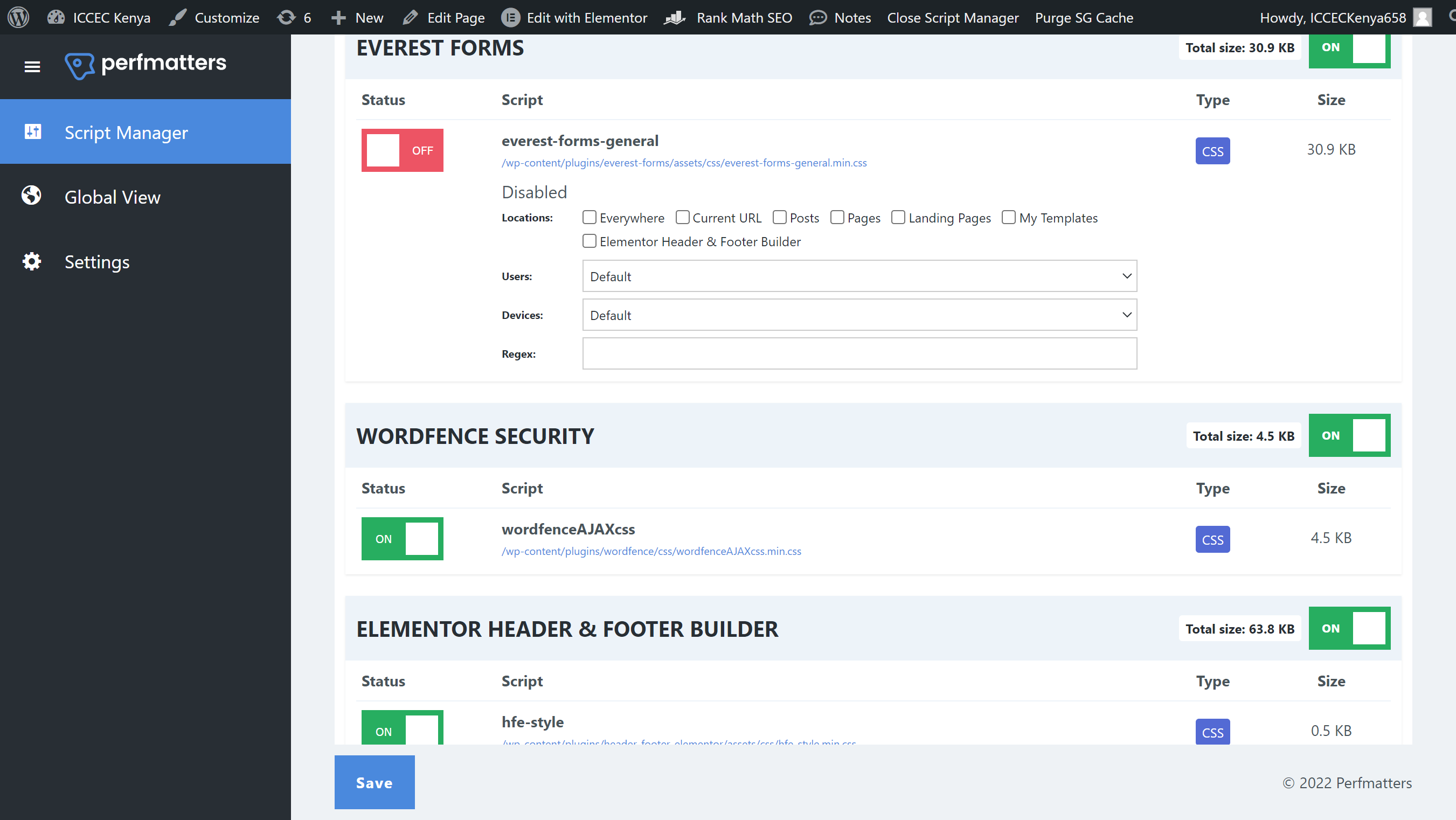
Script Plugins
Both Plugins bring you to a place where you can see what is loading on each page. The image above shows you have on this homepage, Everest Forms is loading some code. I don’t use forms on my homepage, so I disabled them. Now when the page is loaded, this will not load or be included in your cache, hence the page is smaller and faster.
TIP 1: Do this slowly and a page at a time. You can disable scripts that the page needs. Disable, Clear Cache, Check, Repeat.
TIP 2: The scripts can be turned back on at any time, so don’t worry if you make a mistake.
Use a Cache Plugin

A Full Cache plugin for all your files, not just your images. They store a version of your webpage so that it can be displayed on a browser faster. Webpages are often created the moment the user asks for them, and a cache keeps a rebuilt copy to display it faster. Even if you use a cache, you still need to optimize the image size. Here are some cache plugins we have used and recommend: SG Optimizer, WP Rocket, W3 Total Cache, WP Fastest Cache,
Use CDN

A Content Delivery System (CDN) makes copies of your web page and stores them on servers located all over the world. The CDN system answers a request for your webpage from the service that is nearest or faster. Even if you use a CDN, you still need to optimize the image size. We have used Cloudflare CDN for many years and we can recommend it. It works great with WordPress. Some hosts like SiteGround provide this as part of your hosting. Here is a video on how to set up Cloudflare. It requires some technical skills, but this video is helpful.
FAQ
Why is Page Speed Important?
How to Measure Page Speed?
More Church Resources
SEO for the Church
How to Get Found!
Google My Business
Easy Start, Easy Setup, Powerful
Website Best Practices
Websites have some rules to help.
How to Measure Success
If you can’t measure it, it doesn’t exist.